
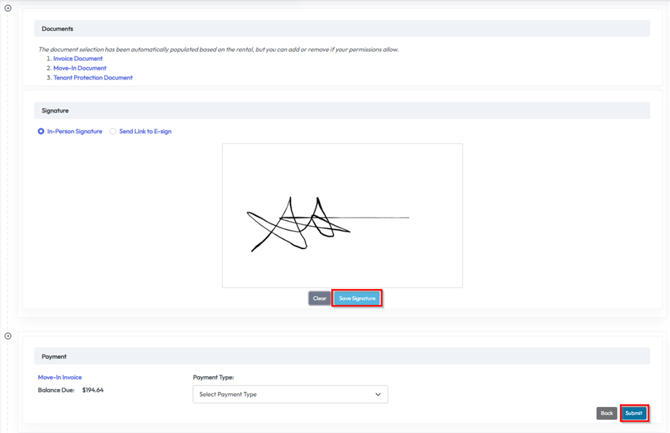
The final step before collecting payment during the move-in process is capturing the tenant’s signature on the rental agreement. This can be completed either in person or via e-signature.
In-Person Signatures
If you’re completing the move-in through the admin portal with the tenant present:
- Simply have the tenant draw their signature directly in the signature box
- This will immediately capture the signature and add it to their agreement
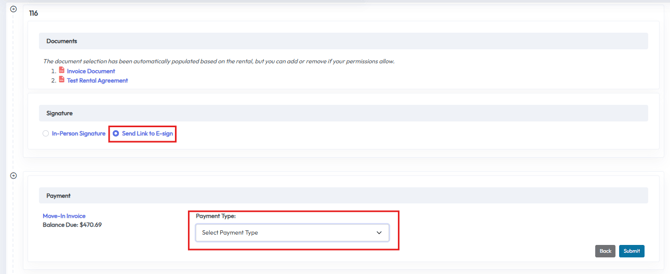
Sending an E-Signature Link
If the tenant is not present, you can use the Send Link to eSign option:
- This will email a link to the tenant
- The tenant can sign the agreement from their own device at their convenience
Sending an E-Signature Link to Active Tenants
If the tenant has already moved in, you can use the eSign Request template:
- This will email a link to the tenant so can sign the agreement from their own device at their convenience
- This template can be sent to your tenants at any time through the Messaging tab
- The template can also be edited to match your operations in the Document settings
Resending the eSign Request template to all of your tenants can be helpful for operators who are just starting with 6Storage as well as operators who have made changes to their lease and need new signatures from all tenants.
Checking E-Signature Status
To track the status of e-signatures:
- Click on the Tenants tab in the top toolbar
- In the tenants list, check the right-most column labeled eSign

Statuses will show as:
- Completed – The tenant has signed the agreement
- Pending – The signature request was sent but not yet completed
- N/A – No signature request has been sent for this tenant