
Notes on Autopay:
- Autopay is set to run on a tenant's due date. If they are due on the 13th, autopay will attempt on the 13th of every month. It will attempt once on the due date and then it will not attempt again until either a late fee is applied.
- If late fees are not set up, it will not attempt again until the due date of next month.
- Why can't it just run everyday? Most credit card processors charge at least the small transaction fee when attempting to process a credit card transaction even if it ends up declining. If autopay was set to run every day, you could potentially rack up a lot of charges in just transaction fees alone.
- Can I run them manually? Of course! If you're managing your declined transactions and want to try running declined autopay again, you're welcome to any time by taking the payment through the "Pay Now" button on the tenant profile.
If you don't think you're autopay has run, you should first check in the following places before submitting a support ticket:


- Billing Screen > Payments
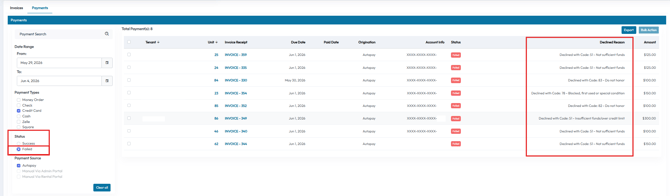
- You can see a "Paid Date" column as well as an "Origination" column. If the Origination is Autopay for any given date you're reviewing, then autopay ran.
-
- If you're reviewing declines, you can click on the "Failed" filter on the left hand side of the screen to view the declines. A "Declined Reason" column is there as well. Some processors have better decline reasons than others. If you don't understand the decline reason, you might get more information on the decline by logging into your payment processor's portal and reviewing the transaction there.
Emailed Report

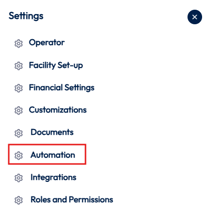
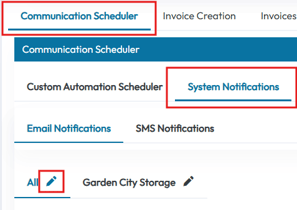

- The facility email on file should be receiving Autopay Reports on days there are eligible autopays to run. If you don't think you're receiving the report, please check your spam, notification, additional inboxes that email providers have these days. You'll want to also ensure you have the setting set to "Yes" under Settings > Automation > System Notifications > Send autopay report.
- If there are additional emails you'd like to receive the report, you can add them in the "Send autopay report." setting as well.