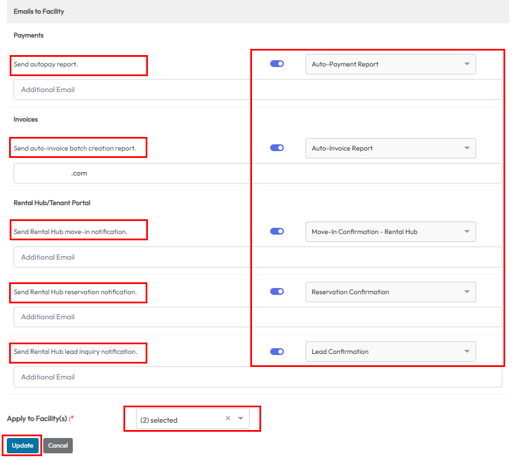
Each setting can be enabled or disabled.
Edit these notification settings by selecting the pencil icon near the facility name.
When editing you can also add additional emails to receive these notifications.
These settings come with a default template that can be customized under Settings > Documents (for tenant emails only - emails sent to the facility are managed by 6Storage).
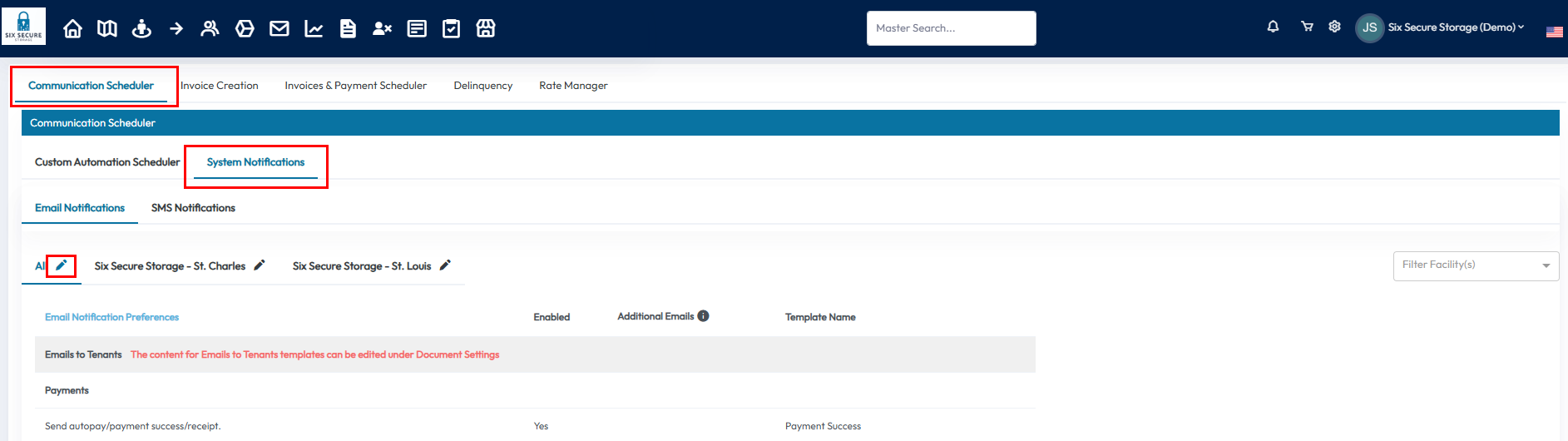
Notifications that are sent to the Tenant:
- Send Autopay/Payment Success - automatically sends an email to the tenant upon successful autopay.
- Send Auto-Pay Failure Notification - automatically sends an email to the tenant notifying them of their autopay decline.
- Send Credit Card Expiration Notice (30 Days Prior To Expiration) - tenants will be notified that their credit card is expiring soon and instructs them to update their information in the tenant portal.
- Send Invoice Upon Auto-Creation - if auto-invoice settings are enabled, invoices will be automatically sent to tenants upon generation.
- Send Access Granted notification when gate/facility access is granted - if a gate/access control system is integrated, the tenant will be notified that their access has been restored.
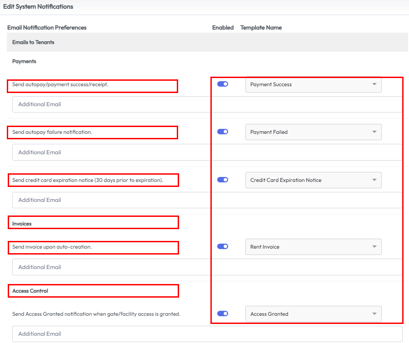
Notifications sent to the Facility Email.
- Send autopay report - this report displays the autopay details for the day.
- Send auto-invoice batch creation report - this report displays the details regarding any invoice that was auto generated.
- Send Rental Hub move-in notification - this email notifies of a new online rental/move-in.
- Send Rental Hub reservation notification - this email notifies of a new reservation.
- Send Rental hub lead inquiry notification - this email notifies of a new lead.